·  00:00:00  ·  ISSUE #214
ALL SYSTEMS NOMINALRSS ↗
BENCHLOGHARDWARE TESTED · SOFTWARE VETTED · IDEAS ARGUED
Subscribe
LIVE WIRE
14:02HARDWARERumor: RTX 5060 Ti 16GB refresh lands in March13:47SOFTWAREObsidian 1.10 beta adds a native sync-conflict view13:20GUIDESAWS cuts Graviton4 on-demand pricing by 9%12:58TALKSWe archived Carmack's 3-hour VR keynote, timestamps included11:31EDITORIALReader poll: 68% of you still run Windows 1010:14HARDWAREBench update: six NAS drives through a 72h stress test09:48GUIDESKubernetes 1.33 released: sidecar containers go GA09:02SOFTWARETailscale 1.80: what actually changed for homelab users08:40FEEDWeekly digest #214 is out for subscribers22:15HARDWARELG's 32″ 4K OLED measured: better than its own spec sheet14:02HARDWARERumor: RTX 5060 Ti 16GB refresh lands in March13:47SOFTWAREObsidian 1.10 beta adds a native sync-conflict view13:20GUIDESAWS cuts Graviton4 on-demand pricing by 9%12:58TALKSWe archived Carmack's 3-hour VR keynote, timestamps included11:31EDITORIALReader poll: 68% of you still run Windows 1010:14HARDWAREBench update: six NAS drives through a 72h stress test09:48GUIDESKubernetes 1.33 released: sidecar containers go GA09:02SOFTWARETailscale 1.80: what actually changed for homelab users08:40FEEDWeekly digest #214 is out for subscribers22:15HARDWARELG's 32″ 4K OLED measured: better than its own spec sheet

03 / HardwareReviewPeripheralsTerafied

Hardware · Video Review

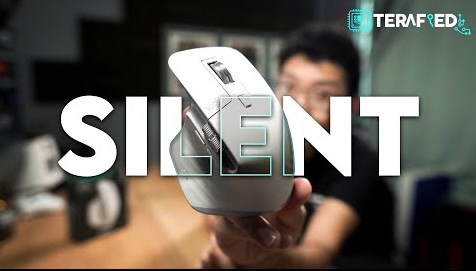
Logitech MX Master 3S: still the default mouse for people who ship software

Terafied's review calls the 3S a quiet upgrade that may not justify leaving the MX Master 3. We agree — and still recommend the 3S as the first mouse most developers should buy if they own neither.

Score 8.8/10Peripherals#productivity~$100~10 minYouTubeArchived 1 Sept 2026
Terafied
Source channelTerafied
8.8/10
On this page
  1. 00 · Watch
  2. 01 · The take
  3. 02 · Scores
  4. 03 · Pros & cons
  5. 04 · Notes
  6. 05 · On camera
  7. 06 · What matters for engineering work
  8. 07 · 3 vs 3S — honest upgrade table
  9. 08 · Buy this / skip this
00

Watch the review

Source: TerafiedWatch original ↗

Benchlog archives and annotates public hardware reviews. The original video remains the property of its respective channel and rights holders.

01

The Benchlog take

Quiet clicks and MagSpeed scrolling still make the MX Master 3S the productivity mouse to beat. Upgrade from a 3 only if silence matters; buy fresh if you are still on a cheap office oval.
02

Score breakdown

Category scores from the Benchlog desk after living with the hardware.

Ergonomics9.3
Scrolling / gestures9.4
Multi-device9
Quiet clicks9.1
Software dependence7.2
Value / upgrade path7.8
03

Pros & cons

Pros

  • MagSpeed + horizontal thumb wheel — code review and timelines
  • Flow / Easy-Switch across Mac and Windows machines
  • Quiet clicks for open offices and late-night pairing

Cons

  • Options+ dependency; limited onboard profiles vs gaming mice
  • Right-hand only — lefties need another story
  • Not a low-latency FPS mouse — do not buy it for that
04

Benchlog notes

Written context that sits beside the video — what the numbers mean for a real build.

The MX Master line is the rare peripheral that shows up on designer desks and SRE laptops for the same reason: hours of cursor work without drama. The 3S iteration is not a redesign — it is quieter switches and a higher DPI ceiling on the same sculpted shell.

Terafied's video is blunt: if you already own an MX Master 3, the upgrade is incremental. That honesty is why we paired it. Our job is the software-desk framing — when the 3S is still the right cart item.

06

What matters for engineering work

MagSpeed scrolling is the killer feature for logs, diffs, and long docs. Ratchet for line-by-line; free-spin for jumping a thousand lines of Kubernetes YAML without carpal theater.

Easy-Switch + Flow earn their keep on dual-machine desks (MacBook + Linux tower). Gesture button mapped to desktop switch or back/forward beats trackpad gymnastics mid-PR.

Pull

Buy the 3S if you have no Master. Keep the 3 if silence is not your bottleneck.

07

3 vs 3S — honest upgrade table

ChangeWorth it if…
Quiet ClickOpen office / shared rooms / late calls
8000 DPI ceilingHigh-res / multi-monitor fine control
Same shape / wheelYou already love the 3 — muscle memory stays
Same street price bandBuying new: get 3S. Owning 3: usually keep it
08

Buy this / skip this

If you…Verdict
Ship software 8+ hours/day on a mouseBuy 3S
Own MX Master 3 and like itSkip — unless quiet clicks are required
Want a gaming + work hybridLook at G502 / lighter ergo hybrids
Are left-handedDo not force this shell

Paired with a QMK board and a single-cable dock, the MX Master 3S is still the mouse we hand to a new engineer on day one.

The writer
Written by

Tarique Anowar

Founder & Editor · Editorial Desk

Builds Benchlog from the bench: hardware logs, software installs, and guides written after living with the stack — not the press kit.

T. Anowar

The Sunday Bench Report

96,400 READERS · ZERO TRACKING PIXELS · UNSUBSCRIBE IN ONE CLICK