·  00:00:00  ·  ISSUE #214
ALL SYSTEMS NOMINALRSS ↗
BENCHLOGHARDWARE TESTED · SOFTWARE VETTED · IDEAS ARGUED
Subscribe
LIVE WIRE
14:02HARDWARERumor: RTX 5060 Ti 16GB refresh lands in March13:47SOFTWAREObsidian 1.10 beta adds a native sync-conflict view13:20GUIDESAWS cuts Graviton4 on-demand pricing by 9%12:58TALKSWe archived Carmack's 3-hour VR keynote, timestamps included11:31EDITORIALReader poll: 68% of you still run Windows 1010:14HARDWAREBench update: six NAS drives through a 72h stress test09:48GUIDESKubernetes 1.33 released: sidecar containers go GA09:02SOFTWARETailscale 1.80: what actually changed for homelab users08:40FEEDWeekly digest #214 is out for subscribers22:15HARDWARELG's 32″ 4K OLED measured: better than its own spec sheet14:02HARDWARERumor: RTX 5060 Ti 16GB refresh lands in March13:47SOFTWAREObsidian 1.10 beta adds a native sync-conflict view13:20GUIDESAWS cuts Graviton4 on-demand pricing by 9%12:58TALKSWe archived Carmack's 3-hour VR keynote, timestamps included11:31EDITORIALReader poll: 68% of you still run Windows 1010:14HARDWAREBench update: six NAS drives through a 72h stress test09:48GUIDESKubernetes 1.33 released: sidecar containers go GA09:02SOFTWARETailscale 1.80: what actually changed for homelab users08:40FEEDWeekly digest #214 is out for subscribers22:15HARDWARELG's 32″ 4K OLED measured: better than its own spec sheet

03 / HardwareReviewPeripheralsRaymond Mercedes

Hardware · Video Review

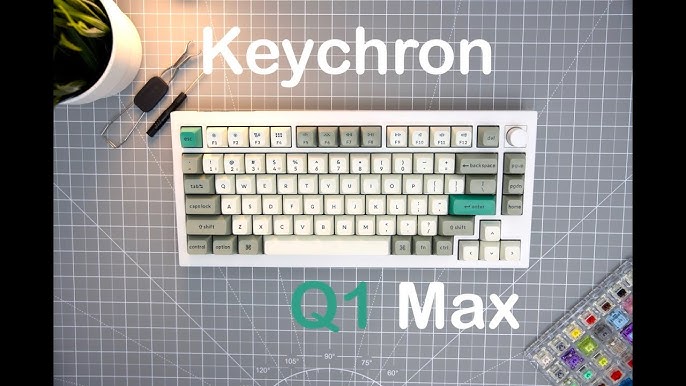
Keychron Q1 Max: the wireless gasket board developers keep recommending

Raymond Mercedes walks the Q1 Max for Mac users. We add the software-engineering desk notes: QMK/VIA layers, Mac/Win flip, and whether aluminum wireless is worth ~$210 over a plastic board.

Score 8.7/10Peripherals#productivity#devtools~$210~12 minYouTubeArchived 1 Sept 2026
Keychron Q1 Max: the wireless gasket board developers keep recommending
Source channelRaymond Mercedes
8.7/10
On this page
  1. 00 · Watch
  2. 01 · The take
  3. 02 · Scores
  4. 03 · Pros & cons
  5. 04 · Notes
  6. 05 · On camera
  7. 06 · Why developers care
  8. 07 · Specs that survive the unboxing
  9. 08 · Buy this / skip this
00

Watch the review

Source: Raymond MercedesWatch original ↗

Benchlog archives and annotates public hardware reviews. The original video remains the property of its respective channel and rights holders.

01

The Benchlog take

If you type for a living and want QMK without a soldering iron, the Q1 Max is the boring-smart endgame — wireless gasket feel, Mac-friendly layout, and a knob you will actually bind to volume.
02

Score breakdown

Category scores from the Benchlog desk after living with the hardware.

Typing feel9.1
Build / acoustics9
Firmware (QMK/VIA)9.2
Wireless8.6
Value8
Portability7.2
03

Pros & cons

Pros

  • QMK/VIA out of the box — layers for IDE, terminal, browser
  • Aluminum gasket board without a custom group buy wait
  • Mac/Windows switch and included legends — dual-machine desks

Cons

  • Heavy travel brick compared with low-profile boards
  • RGB / legend taste is subjective — not a stealth office board
  • Moonlander / ergo split still wins if wrist angles are the priority
04

Benchlog notes

Written context that sits beside the video — what the numbers mean for a real build.

Most "best keyboard for coding" lists are vibes. The Keychron Q1 Max earns a harder look because the ingredients are specific: CNC aluminum, gasket mount, hot-swap, and official QMK/VIA — the firmware path that lets a developer remap a layer for tmux, Raycast, and browser tabs without proprietary cloud nonsense.

The embedded video is Raymond Mercedes' walkthrough aimed at Mac users. This page is the Benchlog companion: what matters on a software desk, what to ignore from RGB demos, and when to buy a split ergo instead.

05

On camera

https://www.youtube.com/watch?v=zFfpmMFt1KI · full

Watch for the Mac/Windows hardware switch, battery claims, and the knob — then come back here for the desk verdict.

06

Why developers care

VIA layers beat stickers. Bind a coding layer once: media on the knob, F-row as window controls, arrows under homerow if you want. That is the difference between a nice board and infrastructure.

Tri-mode wireless is practical, not a gimmick. 2.4 GHz at 1000 Hz for the workstation, Bluetooth for the laptop you carry to a café. Wired when you want zero battery anxiety in a long compile session.

Pull

QMK is the feature. Aluminum is the excuse to keep it on the desk for five years.

mechanical-keyboard-teardown
Fig. — Mechanical board teardown context on the Benchlog desk archive.
07

Specs that survive the unboxing

ClaimWhat it means on a desk
75% + knobFunction row + arrows without a full-size footprint
Gasket + foamsSofter typing sound; neighbors notice less
Hot-swap JupiterTry tactile/linear without soldering
Mac/Win switchOne board across MBP + Linux box
~$210 MSRPCheaper than many boutique customs; pricier than Keychron K-lines
08

Buy this / skip this

If you…Verdict
Want QMK without a group-buy waitBuy Q1 Max
Need extreme ergo / columnar staggerLook at ZSA Moonlander / Voyager
Want silent open-office stealthConsider low-profile or silent switches
Only type occasionallyA Keychron K-line is enough

For the Benchlog software desk — Zed, terminals, long review drafts — the Q1 Max is the keyboard we would put in a "stop researching, buy this" cart.

The writer
Written by

Tarique Anowar

Founder & Editor · Editorial Desk

Builds Benchlog from the bench: hardware logs, software installs, and guides written after living with the stack — not the press kit.

T. Anowar

The Sunday Bench Report

96,400 READERS · ZERO TRACKING PIXELS · UNSUBSCRIBE IN ONE CLICK